Fill the W-2 Form Online — Free, Fillable, Printable
The 2026 IRS Wage and Tax Statement — opens in your browser in one click
Official source: irs.gov/pub/irs-pdf/fw2.pdf
About the W-2
The W-2 Form reports an employee's annual wages and the taxes withheld from their paycheck. Employers must issue a W-2 to every employee they paid more than $600 in the tax year, and file copies with the Social Security Administration by January 31. Fill out the 2026 W-2 directly in your browser — no upload, no account, no watermark — and download a clean PDF or print it for your records.
How to Fill the W-2 Online — in 4 Steps
1. Click "Fill W-2 Form Free"
The button above opens the official W-2 inside the PDF Edit editor — running entirely in your browser. No download, no signup, no upload.
2. Type directly into the form fields
Click any field to place your cursor and type. Tab moves to the next field. Every native AcroForm field is recognised — no guesswork about where to click.
3. Sign, stamp, or annotate as needed
Use the toolbar to add a signature image, a date stamp, or a free-text note. Everything stays inside your browser — no third party ever sees your entries.
4. Save or print your completed W-2
Click Save to download the filled PDF, or press Ctrl+P (⌘+P on Mac) to print. The output has no watermark and matches the layout of the official W-2 exactly.
W-2 Box-by-Box Guide
- Box a Employee's Social Security Number Enter the employee's 9-digit SSN exactly as it appears on their Social Security card.
- Box b Employer Identification Number (EIN) The IRS-issued 9-digit EIN for the business filing the W-2.
- Box c Employer's Name, Address, and ZIP Legal business name and full mailing address, including ZIP+4 when available.
- Box d Control Number Optional — used by payroll systems to identify individual W-2s within a batch. Leave blank if you don't use one.
- Box e-f Employee's Name and Address Full legal name (first, middle initial, last) and current mailing address matching the employee's records.
- Box 1 Wages, Tips, Other Compensation Total taxable wages for federal income tax — excludes pre-tax contributions like 401(k) and section 125 health premiums.
- Box 2 Federal Income Tax Withheld Total federal income tax withheld from all paychecks during the year.
- Box 3 Social Security Wages Wages subject to Social Security tax — capped at the annual wage base ($168,600 for 2024; check current year).
- Box 4 Social Security Tax Withheld Typically 6.2% of Box 3. Do not exceed the maximum contribution for the year.
- Box 5 Medicare Wages and Tips Medicare-taxable wages — no cap. Often higher than Box 1 because it includes 401(k) contributions.
- Box 6 Medicare Tax Withheld 1.45% of Box 5, plus 0.9% additional Medicare tax on wages over $200,000.
- Box 12 Codes (401k, HSA, etc.) Use IRS codes A–HH to report items like 401(k) deferrals (D), HSA contributions (W), and group-term life insurance (C).
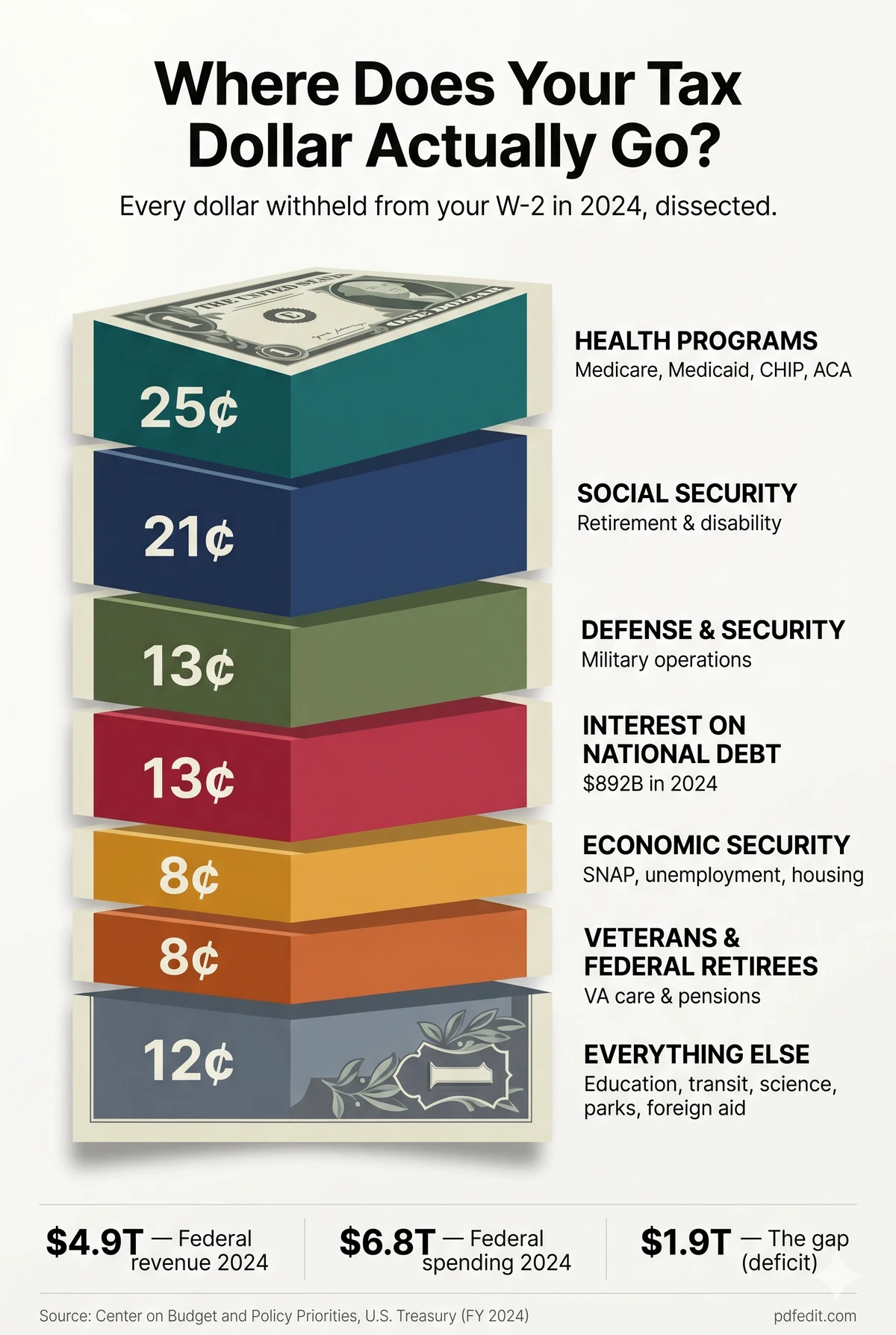
Where Does Your Tax Dollar Actually Go?
Every dollar withheld from your W-2 in 2024, dissected.

Use this infographic on your site
License: Free to republish with a link back to PDF Edit.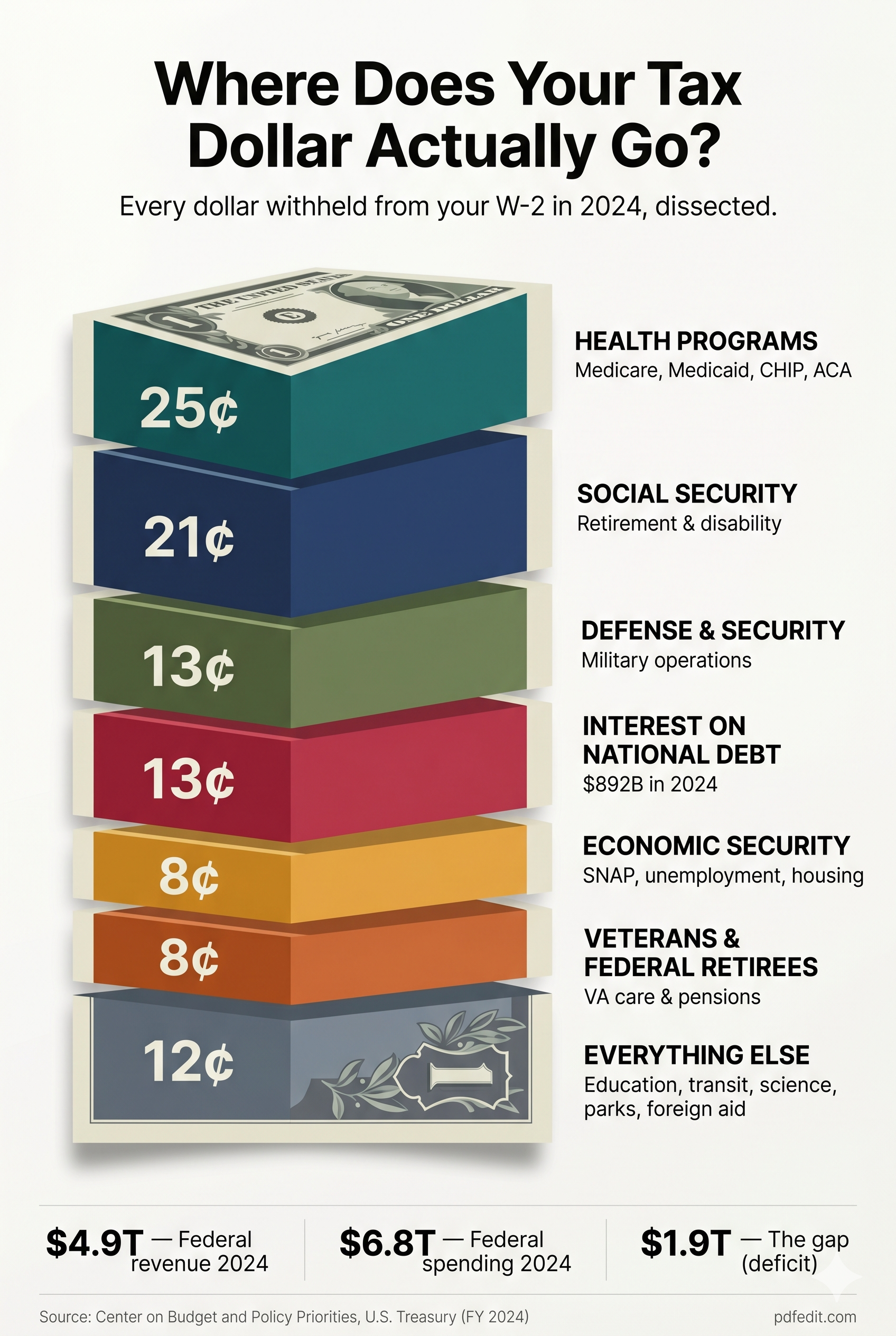

Why Use PDF Edit for the W-2?
Fillable — really fillable
Every form in our library loads as a native AcroForm PDF with live fields you can click and type into. Not a flat scan, not a separate data entry form that rebuilds a new PDF on download.
100% in your browser
The W-2 is opened and edited entirely on your device. SSNs, wages, addresses — nothing leaves your machine. There is no server-side copy because there is no server.
No watermark, no paywall
The saved PDF is the same official form, no "edited with pdfedit.com" banner, no "upgrade to download". Free forever, ad-supported.
Printable, too
Save the PDF for digital filing, or Ctrl+P to print a clean, mail-ready copy. Margins and alignment match the original.
Always the current year
We track the official Internal Revenue Service (IRS) release and update the source PDF when a new revision is published. This landing page was last verified on 2026-05-07.
Works on anything
Windows, Mac, Linux, Chromebook, iPad, iPhone, Android — any modern browser. No install, no admin rights, no plugin.
Frequently Asked Questions
When should you receive your W-2 from your employer?
Employers must furnish W-2 forms to employees by January 31 each year. If you haven't received yours by mid-February, contact your employer first. If it still hasn't arrived by the end of February, call the IRS at 800-829-1040 — they will send a Form 4852 you can use as a substitute W-2 to file your taxes on time.
What is a W-2 form?
The W-2 (Wage and Tax Statement) is an IRS tax form that reports an employee's annual wages and the federal, state, Social Security, and Medicare taxes withheld from their paychecks. Employers issue one W-2 per employee and file copies with the Social Security Administration.
Who receives a W-2 form?
Every employee who was paid $600 or more in wages during the tax year, or had any federal income, Social Security, or Medicare tax withheld, must receive a W-2 from their employer. Independent contractors do not receive a W-2 — they receive a 1099-NEC instead.
What is the difference between a W-2 and a W-4?
A W-4 is filled out by the employee at hire to tell the employer how much federal income tax to withhold. A W-2 is issued by the employer at year-end summarizing actual wages paid and taxes withheld. You fill out a W-4 once (and update it when life changes); you receive a W-2 every year you work as an employee.
How do I fill out a W-2 form for an employee?
As an employer, you enter the employee's SSN (Box a), your EIN (Box b), the employer and employee names and addresses, then report wages and taxes in Boxes 1–14. Use Box 12 codes for items like 401(k) deferrals (D) and HSA contributions (W). The guide above walks through each box. File Copy A with the SSA and give Copies B, C, and 2 to the employee by January 31.
Can I fill out the W-2 online for free?
Yes. PDF Edit loads the official 2026 IRS W-2 form in your browser and lets you type directly into every field. No account, no email, no watermark, and the form never leaves your device. Click "Fill W-2 Form Free" above to start.
Is my W-2 data safe on PDF Edit?
Yes — your W-2 is opened and edited entirely inside your browser. There is no upload, no server-side processing, and no storage on our end. We literally cannot see the wages, SSNs, or addresses you enter. Your data never crosses the internet.
Is this the official 2026 W-2 form?
Yes. PDF Edit loads the original W-2 form published by the IRS (irs.gov/pub/irs-pdf/fw2.pdf). We do not recreate the form or alter its layout — you're editing the exact document the IRS accepts.
Can I save and print my completed W-2?
Yes. After filling in the fields, click Save to download the completed PDF. Use Ctrl+P (Cmd+P on Mac) to print directly from the editor. The printed form retains IRS-acceptable formatting.
Can I file the W-2 online with the SSA?
Not directly through PDF Edit — you'll need to use the SSA's Business Services Online (BSO) at ssa.gov/bso to file electronically, or mail Copy A to the SSA. PDF Edit is for filling, reviewing, and saving a clean copy for your records or for distribution to employees.