Fill the Record of Employment (ROE) — Canada
Service Canada ROE — the document employers issue when an employee stops working
Official source: canada.ca/en/employment-social-development/programs/ei/ei-list/reports/roe-guide.html
About the ROE
The Record of Employment (ROE) is the document Service Canada employers issue every time an employee experiences an interruption in earnings — termination, layoff, leave of absence, end of contract. The ROE drives EI (Employment Insurance) eligibility and benefit calculation. Most employers now issue ROEs electronically through ROE Web (which doesn't expose a downloadable PDF), but the paper Service Canada ROE remains in use for small employers without ROE Web access. PDF Edit is for that paper-form workflow and for understanding the codes used in each block before transmitting through ROE Web.
How to Fill the ROE Online — in 4 Steps
1. Click "Fill ROE Form Free"
The button above opens the official ROE inside the PDF Edit editor — running entirely in your browser. No download, no signup, no upload.
2. Type directly into the form fields
Click any field to place your cursor and type. Tab moves to the next field. Every native AcroForm field is recognised — no guesswork about where to click.
3. Sign, stamp, or annotate as needed
Use the toolbar to add a signature image, a date stamp, or a free-text note. Everything stays inside your browser — no third party ever sees your entries.
4. Save or print your completed ROE
Click Save to download the filled PDF, or press Ctrl+P (⌘+P on Mac) to print. The output has no watermark and matches the layout of the official ROE exactly.
Record of Employment — Block 16 Reason Codes
Pick the right code in 3 questions. Wrong code = delayed EI claim.

Use this infographic on your site
License: CC-BY — Free to republish with a link back to PDF Edit.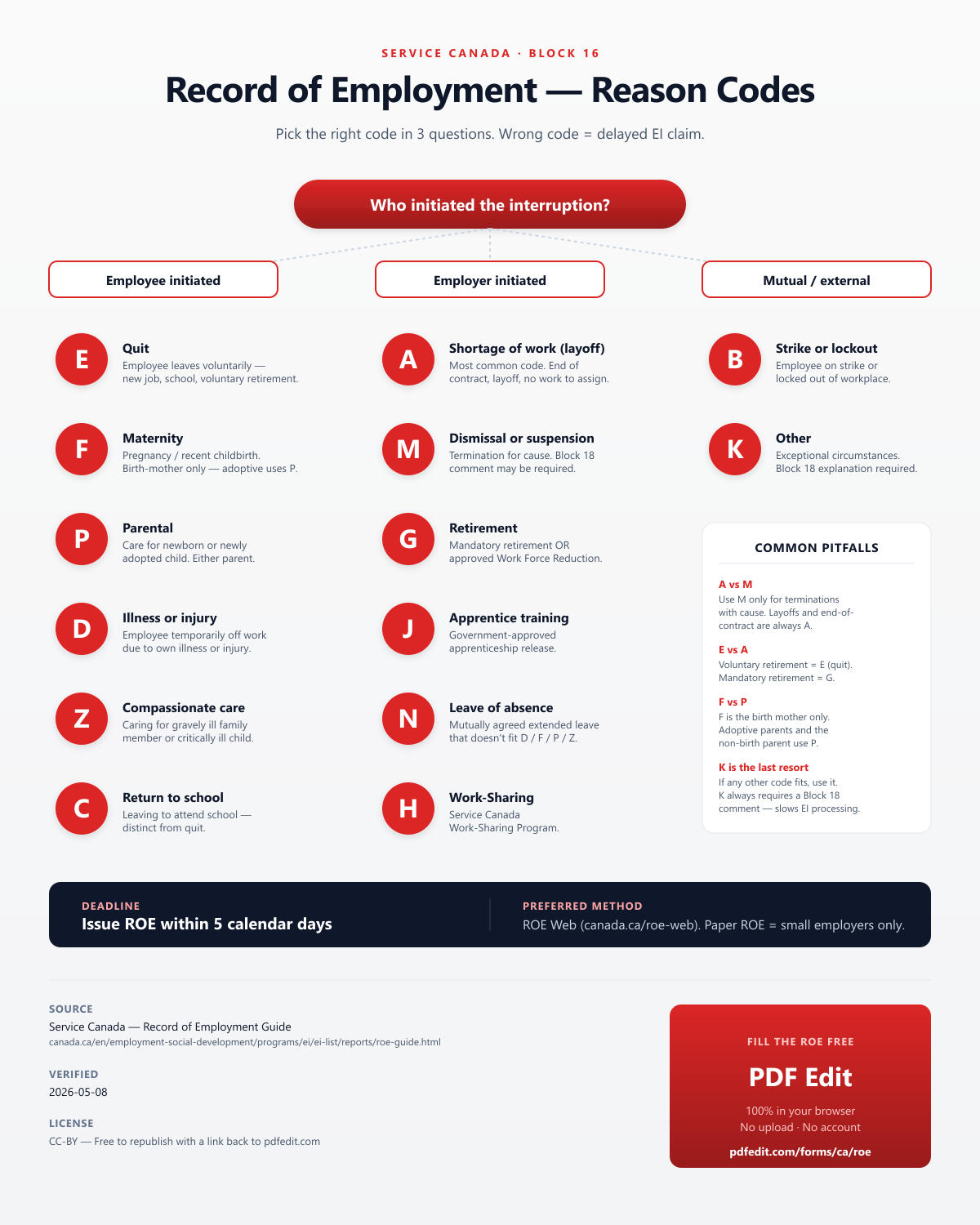
Why Use PDF Edit for the ROE?
Fillable — really fillable
Every form in our library loads as a native AcroForm PDF with live fields you can click and type into. Not a flat scan, not a separate data entry form that rebuilds a new PDF on download.
100% in your browser
The ROE is opened and edited entirely on your device. SSNs, wages, addresses — nothing leaves your machine. There is no server-side copy because there is no server.
No watermark, no paywall
The saved PDF is the same official form, no "edited with pdfedit.com" banner, no "upgrade to download". Free forever, ad-supported.
Printable, too
Save the PDF for digital filing, or Ctrl+P to print a clean, mail-ready copy. Margins and alignment match the original.
Always the current year
We track the official Service Canada release and update the source PDF when a new revision is published. This landing page was last verified on 2026-05-08.
Works on anything
Windows, Mac, Linux, Chromebook, iPad, iPhone, Android — any modern browser. No install, no admin rights, no plugin.
Frequently Asked Questions
What is a Record of Employment (ROE)?
The Record of Employment (ROE) is a Service Canada form that employers must issue every time an employee experiences an interruption in earnings — termination, layoff, parental leave, sickness, end of contract, etc. The ROE reports insurable earnings and insurable hours over the past 53 weeks (or since the last ROE) and is used by Service Canada to determine the employee's eligibility for Employment Insurance (EI) benefits and the benefit amount.
When does an employer have to issue an ROE?
An ROE must be issued whenever there is an interruption of earnings — defined as seven or more consecutive days without insurable earnings, or when the employee's salary falls below 60% of normal weekly earnings. Common triggers: dismissal, quit, lay-off, leave of absence (parental, sick, compassionate care), end of contract, retirement, or strike/lockout. Even if the employee is not applying for EI, the ROE is still required.
How long does the employer have to issue the ROE?
For ROE Web (electronic): 5 calendar days after the end of the pay period in which the interruption occurred. For paper ROE: 5 calendar days after the interruption, or 5 days after becoming aware of an unforeseen interruption — and the employer must give one copy to the employee and send the original to Service Canada. Failure to issue an ROE on time can delay the employee's EI benefits and trigger penalties.
What are the ROE reason codes?
Block 16 of the ROE uses one-letter reason codes: A (shortage of work / end of contract / lay-off), B (strike or lockout), C (return to school), D (illness or injury), E (quit), F (maternity), G (mandatory retirement), H (work-sharing), J (apprenticeship training), K (other), M (dismissal), N (leave of absence), P (parental), Z (compassionate care). Choose the code that best matches the actual reason — wrong codes can delay or deny EI claims.
How do I issue an ROE — paper or electronic?
Service Canada strongly prefers ROE Web (the online service for employers). It auto-validates, transmits in seconds, and the employee accesses it through their My Service Canada Account. Paper ROEs are only issued by employers who have not registered for ROE Web — those forms are obtained directly from Service Canada (not downloadable as a generic PDF). PDF Edit is useful for the paper version when it has been scanned, or for filling reference copies.
Why can't I download the ROE PDF here?
Service Canada does not publish a generic downloadable ROE PDF — the paper form has serialised numbers and is mailed to registered employers on request, and ROE Web (the electronic version) is not exposed as a fillable PDF. PDF Edit lets you fill any PDF you import (e.g., a scanned blank ROE), but for a fresh blank form, employers must register for ROE Web through Service Canada.
Where can I get a blank ROE form?
Employers register for ROE Web at canada.ca/roe-web — that becomes the primary issuance channel. Paper ROEs are ordered from Service Canada by employers without ROE Web access (request through 1-800-O-Canada or your regional Service Canada Centre). The paper ROE is a controlled multi-part form; it is not published as a freely downloadable PDF.
Is my ROE data safe with PDF Edit?
Yes. PDF Edit processes any document inside your browser. Employee SINs, earnings, and reason codes never cross the internet — important because the ROE contains personal data subject to PIPEDA.
How does the ROE affect EI benefits?
Service Canada uses the ROE to verify the employee's insurable earnings (Block 15B/C) and insurable hours (Block 15A) over the past 53 weeks. These determine whether the employee qualifies for EI (minimum hours required) and the weekly benefit rate (55% of average insurable weekly earnings, capped). An accurate ROE is essential — errors typically require an amended ROE through Service Canada.