Fill the W-9 Form Online — Free, No Upload
The 2025 IRS Request for Taxpayer Identification Number and Certification
Official source: irs.gov/pub/irs-pdf/fw9.pdf
About the W-9
Form W-9 is what businesses ask independent contractors and freelancers to fill out before paying them — it captures the contractor's name, business name, tax classification, and TIN (SSN or EIN) so the payer can issue a 1099-NEC at year end. You sign it once at the start of the engagement; the business keeps it on file (it's never sent to the IRS). Fill the official 2025 IRS W-9 directly in your browser — no upload, no account, no watermark — and email or hand it back to your client.
How to Fill the W-9 Online — in 4 Steps
1. Click "Fill W-9 Form Free"
The button above opens the official W-9 inside the PDF Edit editor — running entirely in your browser. No download, no signup, no upload.
2. Type directly into the form fields
Click any field to place your cursor and type. Tab moves to the next field. Every native AcroForm field is recognised — no guesswork about where to click.
3. Sign, stamp, or annotate as needed
Use the toolbar to add a signature image, a date stamp, or a free-text note. Everything stays inside your browser — no third party ever sees your entries.
4. Save or print your completed W-9
Click Save to download the filled PDF, or press Ctrl+P (⌘+P on Mac) to print. The output has no watermark and matches the layout of the official W-9 exactly.
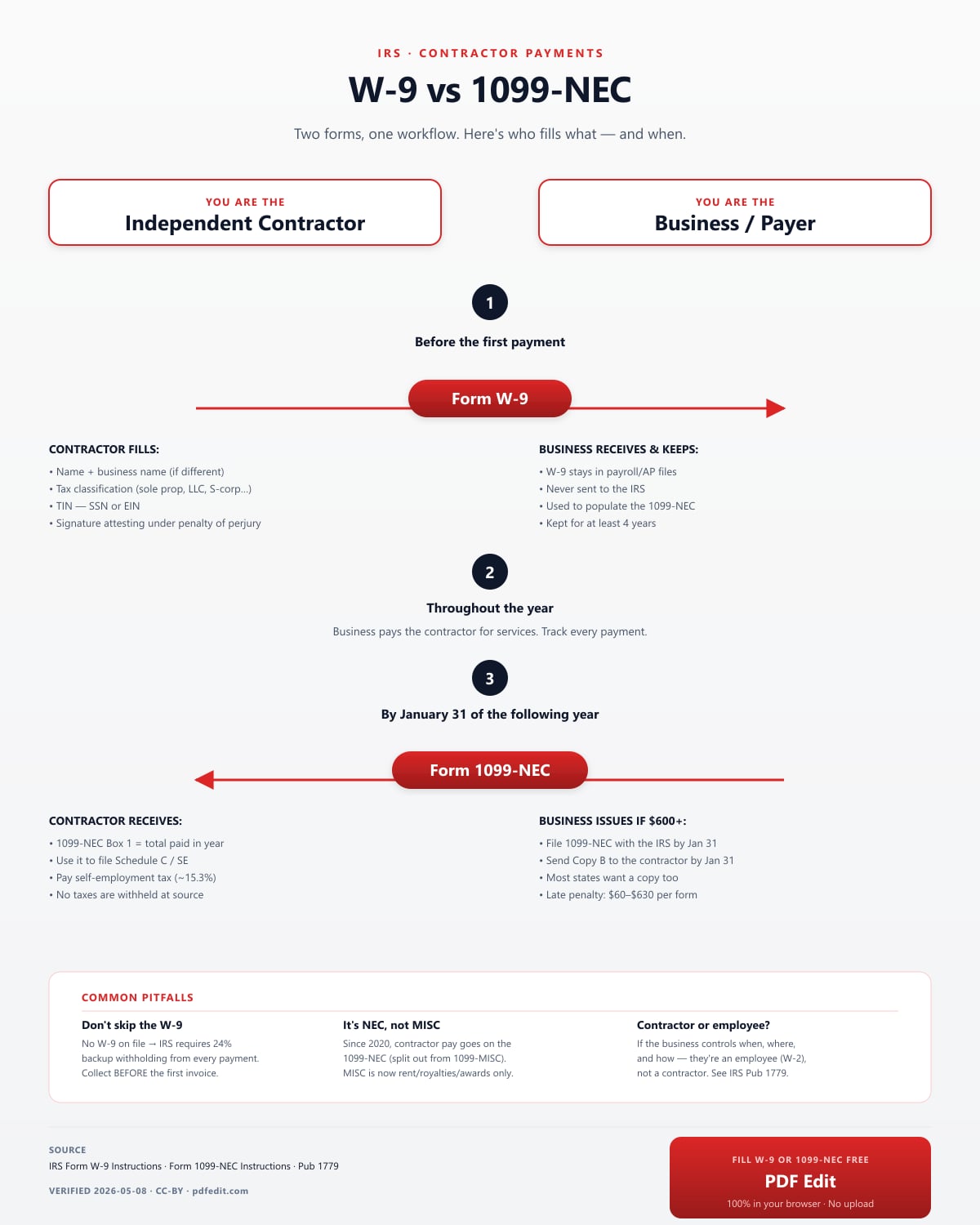
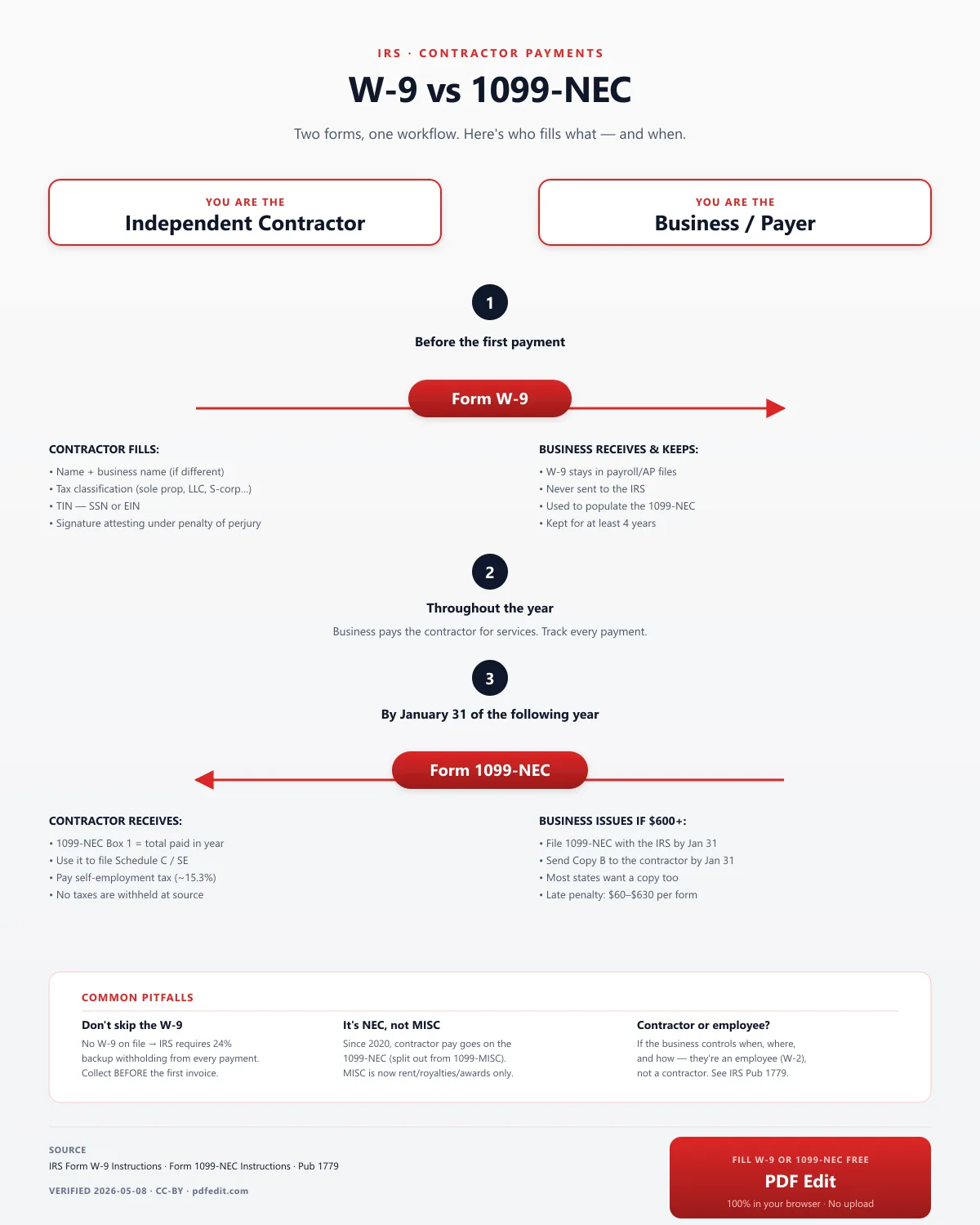
W-9 vs 1099-NEC — Two Forms, One Workflow
The W-9 starts the relationship; the 1099-NEC closes the year. Here's exactly who fills what.

Use this infographic on your site
License: CC-BY — Free to republish with a link back to PDF Edit.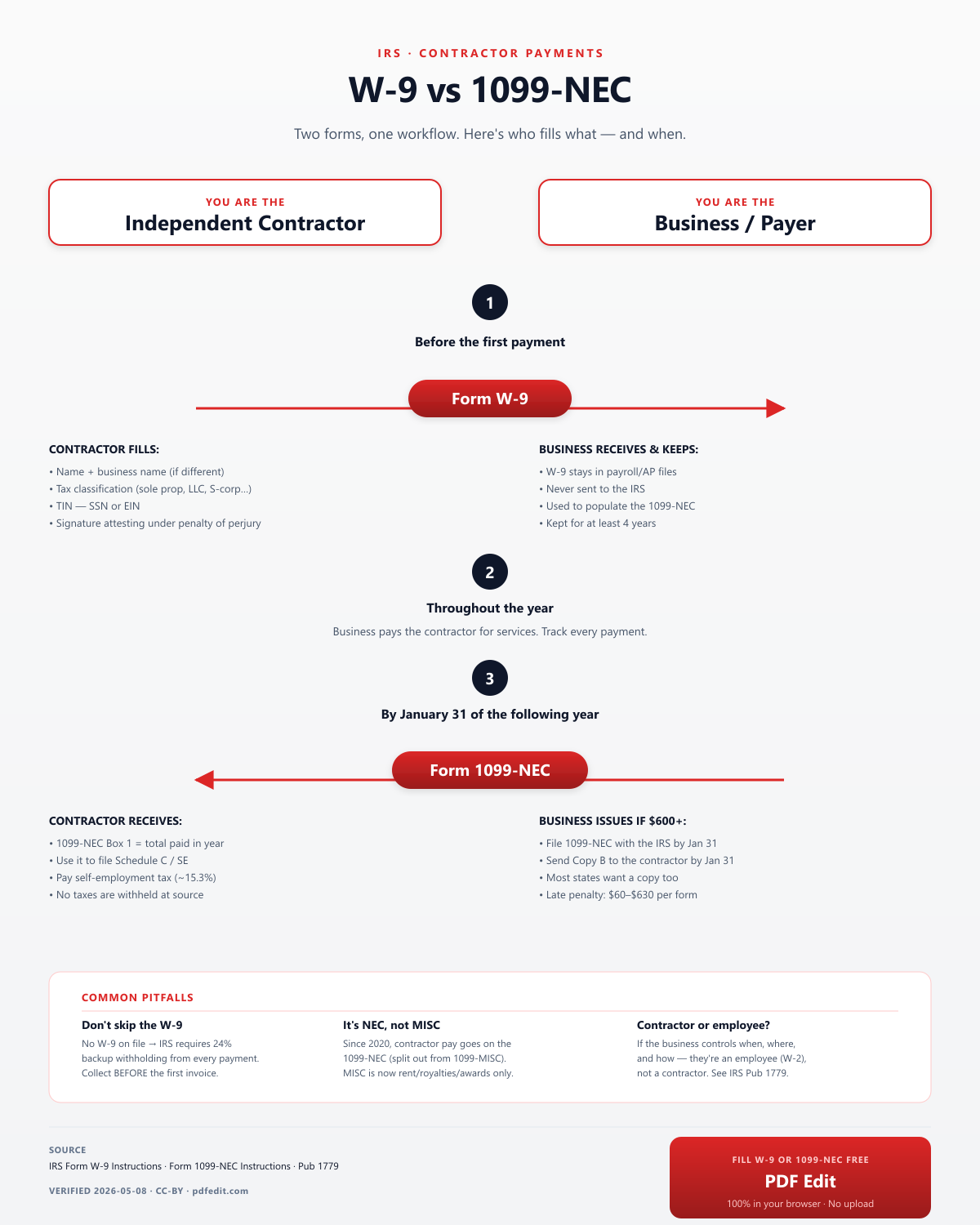
Why Use PDF Edit for the W-9?
Fillable — really fillable
Every form in our library loads as a native AcroForm PDF with live fields you can click and type into. Not a flat scan, not a separate data entry form that rebuilds a new PDF on download.
100% in your browser
The W-9 is opened and edited entirely on your device. SSNs, wages, addresses — nothing leaves your machine. There is no server-side copy because there is no server.
No watermark, no paywall
The saved PDF is the same official form, no "edited with pdfedit.com" banner, no "upgrade to download". Free forever, ad-supported.
Printable, too
Save the PDF for digital filing, or Ctrl+P to print a clean, mail-ready copy. Margins and alignment match the original.
Always the current year
We track the official Internal Revenue Service (IRS) release and update the source PDF when a new revision is published. This landing page was last verified on 2026-05-08.
Works on anything
Windows, Mac, Linux, Chromebook, iPad, iPhone, Android — any modern browser. No install, no admin rights, no plugin.
Frequently Asked Questions
What is Form W-9?
Form W-9 (Request for Taxpayer Identification Number and Certification) is the IRS form a business asks an independent contractor or freelancer to complete before paying them. The form captures the contractor's name, business name, federal tax classification, address, and TIN (SSN or EIN). The business keeps it on file — it is never submitted to the IRS — and uses it to issue a 1099-NEC at year end.
What's the difference between a W-9 and a 1099?
A W-9 is what the contractor fills out at the START of an engagement to give the business their tax information. A 1099 (specifically 1099-NEC since 2020) is what the business issues at the END of the year to report total payments to that contractor. One W-9 → many payments → one 1099-NEC. The infographic on this page walks through the full workflow.
Who fills out a W-9?
The independent contractor, freelancer, sole proprietor, single-member LLC, or other person/entity receiving payment. Employees do not fill out a W-9 — they fill out a W-4. Corporations generally do not need to receive a 1099-NEC, but many businesses still ask for a W-9 to confirm corporate status.
When should I fill out a W-9?
Fill out a W-9 when a client or business asks for one — typically at the start of a contractor engagement, before the first payment. The IRS requires backup withholding of 24% on payments to anyone without a valid W-9 on file, so completing it early is in your interest.
Do I send the W-9 to the IRS?
No. You give the completed W-9 to the business or person who requested it. They keep it on file (typically for at least 4 years) and use it to populate the 1099-NEC they file with the IRS at year end. The W-9 itself never goes to the IRS — only the resulting 1099-NEC does.
What information does the W-9 require?
Your name (and business name if different), federal tax classification (individual/sole proprietor, C-corporation, S-corporation, partnership, LLC, etc.), exempt payee codes if applicable, full address, your TIN (SSN for individuals/sole proprietors, EIN for businesses), and a signed certification under penalties of perjury.
Can I fill out the W-9 online for free?
Yes. PDF Edit loads the official 2025 IRS W-9 in your browser and lets you type directly into every field. No account, no email, no watermark, and the form never leaves your device. Click "Fill W-9 Form Free" above to start.
Is my W-9 data safe with PDF Edit?
Yes — entirely. PDF Edit processes the W-9 inside your browser. Your SSN, EIN, address, and signature never cross the internet. There is no server-side copy and no account required. Your tax data stays on your device.
Is this the official IRS W-9?
Yes. PDF Edit loads the original W-9 PDF directly from the IRS (irs.gov/pub/irs-pdf/fw9.pdf). We do not recreate or alter the form — you are filling the exact document the IRS publishes.
Can I sign the W-9 electronically in PDF Edit?
Yes. Use the Signature tool in the toolbar to draw or upload your signature in Part II. Most businesses accept an electronically signed W-9; some still require a wet signature for their records — check with the requesting party if unsure.
How long is a W-9 valid?
There is no fixed expiration. A W-9 stays on file with the requesting business indefinitely. You should submit a new one whenever your information changes — name change, business structure change, address change, or change of TIN.